
Go to Settings >> System >> Backup and Restore >> Backup Settings.
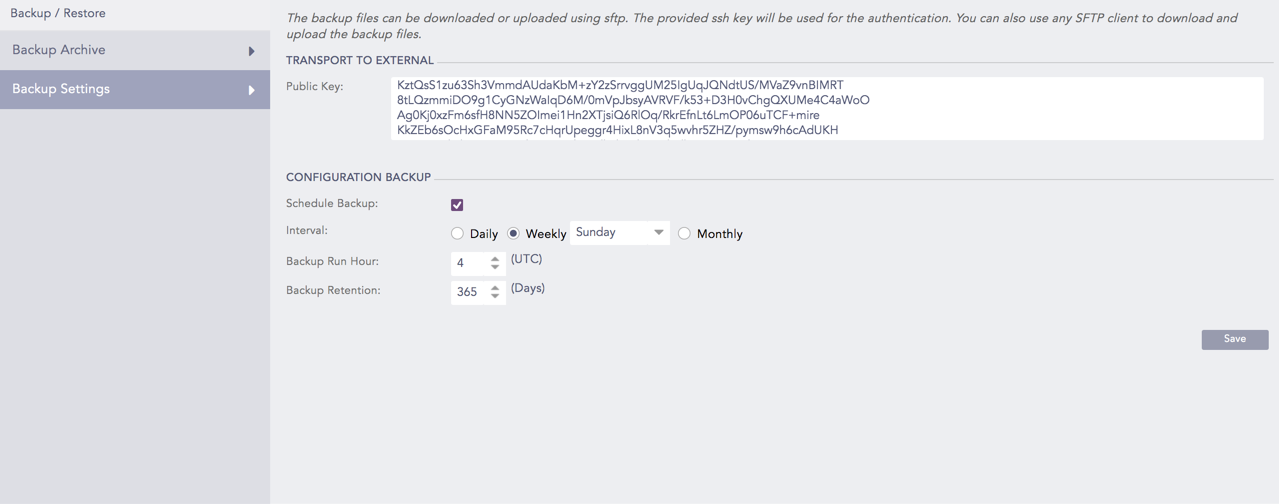
Backup Settings
Enter the Public Key of the SSH key pair.
Note
Save the Public Key. You can use the private key of the SSH key pair to access the backup files using SFTP (SSH File Transfer Protocol).
Select the Schedule Backup checkbox to schedule backups.
Select the Interval of the backup.
Select the Backup Run Hour in UTC. LPSM takes backups on the specified run hour at regular intervals.
Select the Backup Retention period in days. LPSM deletes the backups after the specified number of days from the date of creation.
Click Save.
LPSM also populates the scheduled backups in the Backup Archive list.